
SIDLab
A downloadable tool
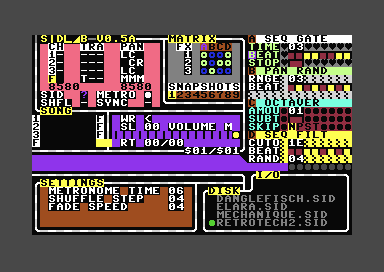
SIDLab is a live DJ / remixing tool for the Commodore 64. It allows you to remix SID music in realtime.
v0.55 - QoL update. MUCH better support for IEC devices, no disk images required! See Whats New file in download for more info or read the dev update on the page.
Quick FAQ:
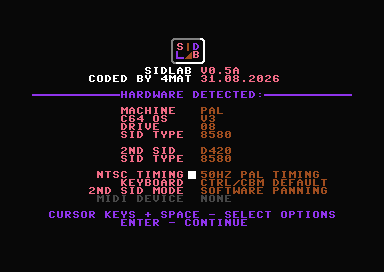
- If you're using an NTSC machine, I suggest the PAL timing option from the setup menu as a lot of popular SID music uses that timing model. This plays back PAL music at the correct speed on NTSC machines.
- Direct syncing (via midi) is currently disabled, but you can use the Hold + Nudge keys (SHIFT+B/N) to easily shift tracks into sync with each other. All songs in the demo video were done this way.
- This uses the slow Kernal load routines for the most compatibility. If you are using an emulator there is normally a 'fast loading/true drive' option you can change for instant loading.
- SID files contain code and data, they are not like tracker/vgm files. For this reason only songs that load into a specific memory area will work. ($0f00-$6fff) This should cover the majority of modern music. If you need to shift a song into this memory space lft has written a tool called Sidreloc that can help with this.
- The keyboard layout is designed to match a real C64. Some emulators swap the CTRL + CBM key positions, you can alter this from the setup menu to make it more comfortable.
Feature status:
- FX set - Additional FX will be added in each build.
- Pitch shift - Pitch detection and playback working, additional work ongoing on slide/offset correction.
- Panning - Basic soft panning algorithm in, additional work on extra algorithms and other panning features ongoing.
- Syncing - Direct sync via midi being worked on but not enabled in builds.
- Fractional Tempo - In progress, this allows two different tempo songs to play in sync.
Links:
The best place to get SID files is DeepSID You can download files by right-clicking on their names. Please read the docs included with SIDLab to see which types of SID files can be used.
If you want to use an emulator I suggest Vice as this software was written using it. If using an emulator I'd suggest running in PAL mode as this has been tested more thoroughly than NTSC.
As of 0.55 you can use an IEC device/virtual folder and just put the program and some SID files into the same folder instead of using disk images. But if you want to use disk images there are tools such as DirMaster to help with this.
Download
Install instructions
Zip file contains a Commodore 64 disk image along with documentation.
Development log
- SIDLab 0.55 - No disk images required!1 day ago
Comments
Log in with itch.io to leave a comment.
Great to see a new version of this!
Can you use an IEC device to load SID files instead of having to bake them into a disk image? Thinking of using my Ultimate 1541's internal IEC device.
I'm using all Kernal routines for the drive so I assume some of it probably works. (like the load/saving) Testing locally in an emulator it seems the directory is blank if I set to an IEC device. I'll have a look if that's an easy fix, the drive stuff is probably the oldest part of the tool. :) I only have space for about 60 filenames from a directory.
After doing some more tests. If I put the sidlab program in a folder with some sid files and set that as the IEC device folder it works.
I can load/save them and also config files. So the main part seems to work.
The directory listing looks a bit weird because I don't have support for caps letters or anything so I can look into that. Is this what you were looking for?
yeah that sounds amazing! Even if there's a limit to how many files you can have, it's much easier to drag and drop SID files and SIDLab in a USB stick than using something like Dirmaster and swap virtual disk images often.
Love it!!
Thanks